
"Documentation"

P-Card Verification

Simple Receipt

    Line 1
      Check Sales Tax Collected box according to Procurement Card Tax Update Matrix attachment Fill appropriate Spend Category for line (Tax Applicability will auto-populate) If Sales Tax Collected was checked, change Tax Applicability to Procurement Card Tax Paid to Supplier - Washington Sales and Use Tax Enter 0304 into Tax Code field and hit Enter; choose 0304 Richland Sales and Use Tax (Tax Recoverability and Tax Option columns will auto-populate) Enter quantity of 1 if all items fall under one budget Unit of Measure should be Each by default Enter total for Unit Cost (Extended Amount will auto-populate) Enter Program, Gift, or Grant as appropriate Attachments
        Use File Names below to name attachments and attach to verification Click Submit

        File Names

        Solution (as of November 9, 2022)

        Introduction

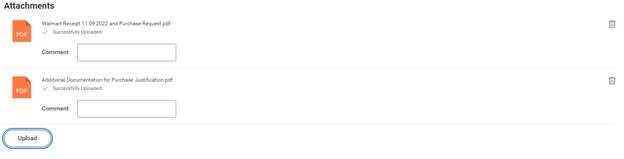
        Please attach at most two PDF files.

        Dates are MM.DD.YYYY and zero-padded; e.g., July 4, 2022 becomes 07.04.2022.

        File One

        This PDF file is only for relevant documents for the transaction like: invoice, receipt, purchase request, affidavit of lost receipt, request to serve food, or P-Card delegation.

        Label your PDF File Supplier's Name <Invoice or Receipt> <Date of Purchase> and Purchase Request.pdf

        • Walmart Receipt 11.09.2022 and Purchase Request.pdf
        • Walmart Receipt 11.09.2022, PR, Request to Serve Food.pdf
        • Walmart Affidavit Receipt 11.09.2022, PR, Request to Serve Food.pdf
        File Two

        This PDF file combines any other files required to justify approval.

        Label your PDF File Additional Documentation for Purchase Justification.pdf

        Example
        workday screenshot