
P-Card Verification
File Names
Solution (as of November 9, 2022)
Introduction
Please attach at most two PDF files.
Dates are MM.DD.YYYY and zero-padded; e.g., July 4, 2022 becomes 07.04.2022.
File One
A javascript web app (using codepen.io) has been created that will create the file name automatically. Feel free to use it freely.
P-Card Attachment Verification File Name
This PDF file is only for relevant documents for the transaction like: invoice, receipt, purchase request, affidavit of lost receipt, request to serve food, or P-Card delegation. (See Valid Document Types below)
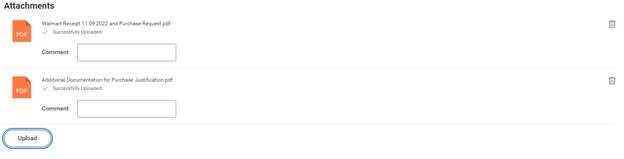
Label your PDF File <Supplier's Name> <Date of Purchase> <Invoice or Receipt> <comma-seperated list of included documents>.pdf
- Walmart 11.09.2022 Receipt, Purchase Request.pdf
- walmart 11.09.2022 receipt, pr, request to serve food.pdf
- Walmart 11.09.2022 Affidavit for Lost Receipt, PR, Request to Serve Food.pdf
Valid Document Types
- Invoice
- Receipt
- Purchase Request [PR]
- Affidavit of Lost Reciept
- Request to Serve Food
- P-Card Delegation
File Two
This PDF file combines any other files required to justify approval.
Label your PDF File Additional Documentation for Purchase Justification.pdf
Example
No comments to display
No comments to display